

Filtering
Filtering provides access control for your phishing campaigns by controlling access to landing
pages and proxies. A filter can match on IP address, country, autonomous system number (ASN),
HTTP headers and TLS fingerprint. Filtering is not a primary security measure but a feature to
allow or deny access based on simple lists. IP filtering can be bypassed using IP forwarding
headers unless the phishing server sits behind a trusted reverse proxy. When
ip_security.trust_proxies is configured, forwarded headers are only honoured from
those proxy addresses, preventing recipients from spoofing their IP.
Country and ASN matching resolve the visitor IP using the Geo IP and ASN data packages. Geo IP
data is built into the binary so country filters work out of the box. ASN data has no built in
copy, so ASN filters only work after the ASN package is downloaded under
Settings, IP Data. Both packages can be refreshed there.
Configure filters during campaign creation in the Options section. Custom deny pages
can also be configured to display alternative content to unauthorized visitors.
Overview
The filtering overview shows you all available filters and whether they are allow or deny lists.
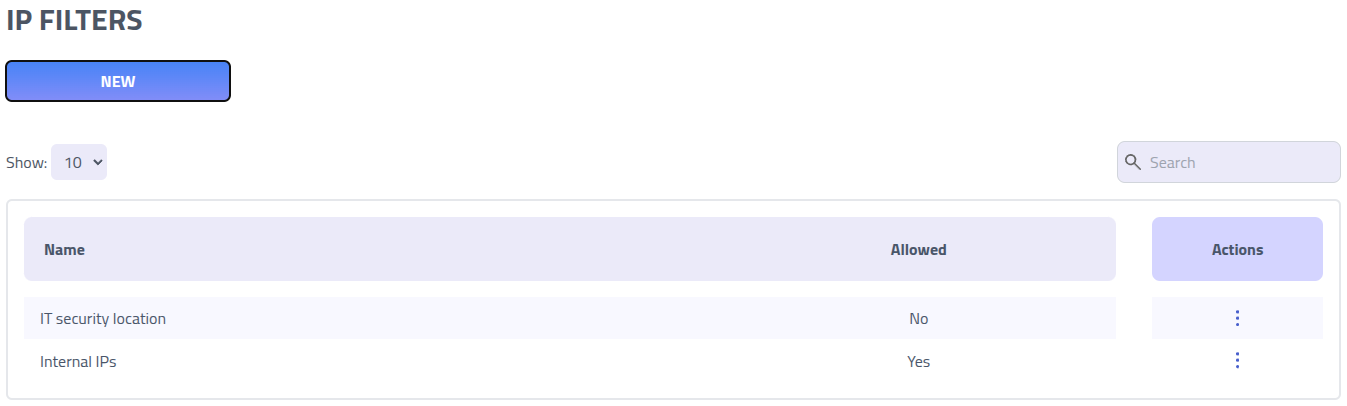
Click on the name of a filter to edit it.
Create new Filter
Filter rules use CIDR notation for IP addresses and JA4 fingerprints for TLS client identification. These rules can be configured as either allow lists (permit only specified IPs/fingerprints) or deny lists (block specified IPs/fingerprints while allowing others).
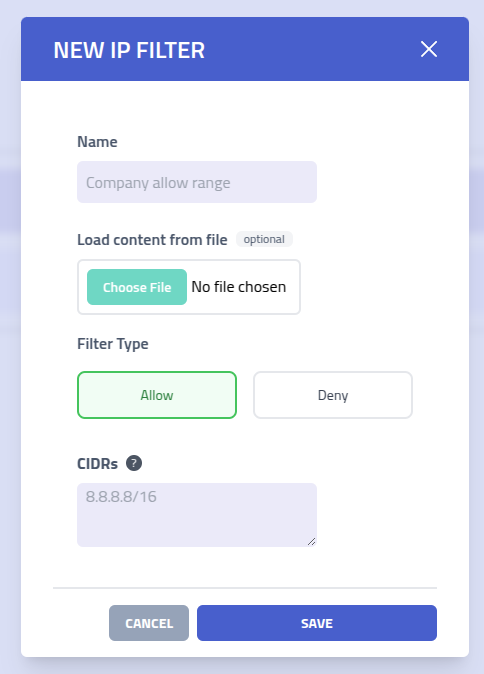
| Setting | Description |
|---|---|
| Filter Name | Descriptive name to identify this filter rule set |
| Filter Type | Choose between Allow (permit only listed IPs/fingerprints) or
Deny
(block listed IPs/fingerprints) filter behavior |
| Header rules | Rules for matching HTTP headers with regular expressions. Both header name and value are
case sensitive by default. Use the (?i) inline flag in a pattern to make that
pattern case insensitive. Both must match. |
| CIDR Ranges | List of IP address ranges in CIDR notation. Single IP addresses are automatically
converted to /32 notation for precise matching |
| GeoIP Country Codes | List of two letter country codes. The visitor IP is resolved to a country and matched against the list. Uses the built in Geo IP data |
| ASNs | List of autonomous system numbers. The visitor IP is resolved to the announcing system and matched against the list. Requires the ASN data package. Search by number or name, and add all matches for a name at once |
| JA4 Fingerprints | List of JA4 TLS fingerprints. Supports wildcard patterns using * to match partial
fingerprints |
A filter needs at least one of these dimensions set. You can combine several, for example an allow list that permits only a country plus a set of ASNs.
GeoIP and ASN filtering
Settings, IP Data so your country filters
keep working after it is removed.Country and ASN filters match the network the visitor comes from rather than a single address. A country filter is useful to keep a campaign inside the target's region. An ASN filter is useful to allow only a corporate network or a known provider, or to deny cloud and hosting providers that scanners and sandboxes run from.
The ASN field searches as you type. Enter a number like 3292, or a name like
M247, and pick from the matches. Each match shows the number, the organisation
name, the country and the registry handle, so a match on a handle such as
M247-UK is clear. When a name returns several systems, use
Add all results to add every match at once.
ASNs disappear from the upstream data when they stop announcing routes. A filter keeps any ASN you saved even if it later leaves the data, and the field marks it with a warning so you can see it will not match until the data changes. Country codes effectively never disappear.
When a filter is configured for a dimension but the visitor IP cannot be resolved for it, an allow list denies the visitor and a deny list allows them. So an allow list on ASN with no ASN data installed denies everyone, which is the safe default.
You can look up which country or ASN an IP resolves to, or search ASNs by name, under
Tools.
JA4 Fingerprints
JA4 is a TLS client fingerprinting method that identifies clients based on their TLS handshake characteristics. This allows you to filter traffic based on the client's browser, operating system, or TLS library.
Wildcard Support
JA4 fingerprints support wildcard patterns using the * character to match any sequence
of characters. This enables flexible filtering based on partial fingerprint matches.
| Pattern | Description |
|---|---|
t13d151*h2_8daaf6152771_* | Matches any fingerprint with specific TLS version, extensions, and cipher hash |
t13d*_*_* | Matches any TLS 1.3 fingerprint with SNI |
* | Matches all fingerprints |
t13d1517h2_* | Matches TLS 1.3 fingerprints with specific extension and ALPN values |
Filter Behavior
When several dimensions are set on one filter, the behavior differs based on filter type:
- Allow Lists: every configured dimension must match for access to be granted. If any check fails, access is denied.
- Deny Lists: if any configured dimension matches the deny list, access is blocked.
A dimension that is left empty does not restrict. A dimension that is set but cannot be evaluated for a visitor, such as a JA4 fingerprint on a non-TLS connection or an ASN with no ASN data installed, is treated as a non match: an allow list denies that visitor, a deny list allows them.